- Home
- About Us
- Services
Migration & Upgrades
Cloud & AI Solutions
- Blogs
- Case Studies
- Contact Us
- Home
- About Us
- Services
Migration & Upgrades
Cloud & AI Solutions
- Blogs
- Case Studies
- Contact Us
Dynamics 365 Business Central Implementation for Growing Businesses
Dynamics 365 Business Central implementation helps businesses streamline finance, inventory, purchasing, sales, reporting and operational workflows through a connected cloud ERP platform designed for long-term operational growth.
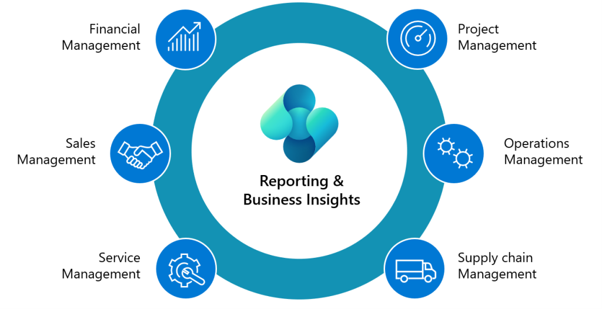
Key Highlights
- Cloud-Based ERP Platform
- Real-Time Financial Visibility
- Inventory & Supply Chain Management
- Integrated Sales & Purchasing
- Business Reporting & Analytics
- Scalable Microsoft Ecosystem
What Is Microsoft Dynamics 365 Business Central?
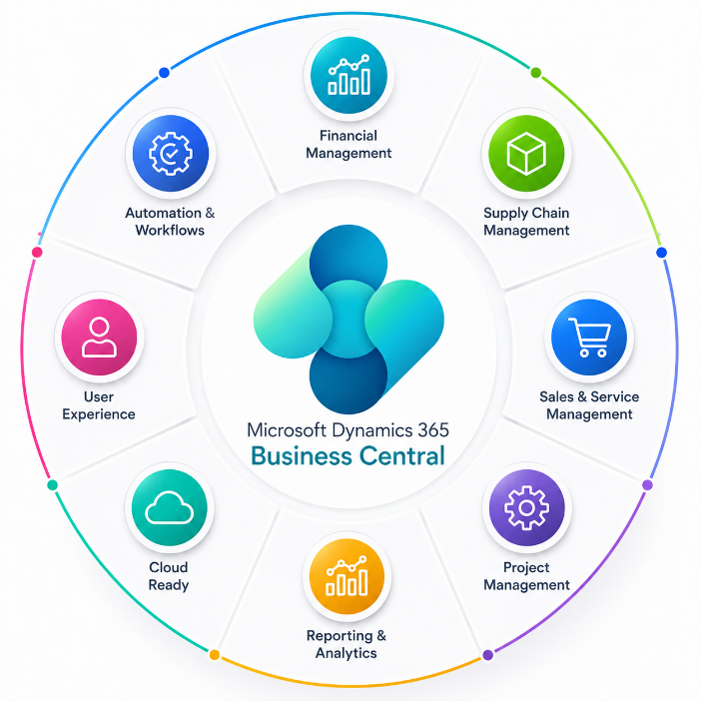
Microsoft Dynamics 365 Business Central is a cloud-based ERP solution that brings finance, inventory, purchasing, sales, customer data and reporting into one connected platform.
Built for growing businesses, it improves operational visibility, reduces manual work and gives teams real-time information for faster, more confident decisions.
How It Works
Common Business Challenges Business Central Solves
Challenge 1
Disconnected Business Systems
Manage finance, inventory, sales, purchasing, and operations from one connected ERP platform.
Challenge 2
Manual Reporting Processes
Generate real-time dashboards and automated business reports without relying on spreadsheets.
Challenge 3
Inventory Tracking Difficulties
Improve inventory visibility, warehouse management, and stock tracking accuracy.
Challenge 4
Delayed Financial Insights
Access real-time financial data for faster business decisions and better operational planning.
Key Features of Dynamics 365
Business Central
Financial Management
Manage accounting, budgeting, cash flow, invoicing, tax management, and financial reporting through a centralized financial management system.
Inventory Management
Track inventory levels, warehouse movements, purchasing workflows, and stock availability in real time.
Sales & Customer Management
Manage quotes, orders, invoices, customer information, and sales workflows through integrated business processes.
Supply Chain Optimization
Improve procurement workflows, vendor management, purchasing processes, and operational efficiency.
Reporting & Analytics
Access real-time dashboards, financial reports, operational insights, and performance analytics to improve decision-making.
Cloud Accessibility
Securely access business systems, data, and workflows from anywhere through cloud-based infrastructure.
Benefits of Dynamics 365
Business Central
Improved Operational Efficiency
Automate business processes and simplify day-to-day operations.
Better Financial Visibility
Access real-time financial insights for faster planning and reporting.
Real-Time Business Reporting
Monitor operational performance through live dashboards and analytics.
Scalable Cloud Infrastructure
Support business growth with flexible cloud-based ERP solutions.
Smarter Decision-Making
Use accurate business data to improve operational and strategic decisions.
Reduced Manual Processes
Automate repetitive tasks and reduce dependency on manual workflows.
Services
Our Dynamics 365 Business Central Implementation Services
Infostork delivers Dynamics 365 Business Central implementation services through business-process discovery, configuration, data migration, customisation, integrations, user training and long-term ERP support.
01
Business Central Implementation
Deploy Business Central with structured planning, workflow configuration, and business-focused implementation strategies.
03
Business Central Migration
Modernise from NAV, Dynamics GP, QuickBooks, Xero or other legacy ERP systems with secure data migration, workflow redesign and cloud-ready Business Central environments.
05
Business Central Support & Maintenance
Provide ongoing monitoring, technical support, optimization, and maintenance services.
02
Business Central Customization
Customize ERP workflows, dashboards, reports, and operational processes based on business requirements.
04
Business Central Integration
Integrate Business Central with Power BI, CRM systems, Azure services, APIs, and third-party platforms.
06
Business Central Consulting & Training
Help teams improve ERP adoption through consulting, user training, and process optimization.

Upgrade Legacy ERP Systems with Confidence
Legacy ERP systems can create reporting delays, disconnected workflows and scalability barriers. Infostork helps businesses move to Business Central through structured migration, secure data transfer and cloud ERP modernisation.
Migration Services
NAV to Business Central Migration
Upgrade legacy NAV systems to modern cloud-based Business Central environments.
Legacy ERP Modernization
Replace outdated systems with a scalable ERP infrastructure built for growth.
Data Migration & Validation
Transfer business data securely with validation and accuracy checks.
Cloud ERP Transition
Move operations to secure cloud-based ERP environments with improved accessibility and scalability.
Start Your ERP Modernization Journey
Upgrade legacy systems, improve financial visibility and build scalable business workflows with Dynamics 365 Business Central.
Why Businesses Choose Infostork for Business Central
Businesses choose Infostork for Dynamics 365 Business Central implementation because our approach combines Microsoft expertise, operational process mapping, AI-led automation, scalable cloud architecture and long-term support.
Microsoft Technology Expertise
Deep specialization across Microsoft Dynamics 365, Azure, Power Platform, and enterprise business systems.
Business-Focused Implementation
ERP implementation strategies aligned with operational goals and workflow optimization.
Migration & Integration Expertise
Structured migration and integration services designed for smooth digital transformation.
Long-Term Support Services
Continuous support, optimization, maintenance, and operational assistance after deployment.
Business-Focused Implementation
Each solution can include AI automation, intelligent reporting and scalable cloud architecture aligned with future operational growth.
AI-Powered ERP Transformation
Infostork combines Dynamics 365 Business Central with Microsoft Copilot, AI automation and intelligent analytics to help teams reduce manual work, improve reporting and act faster on operational data.
AI-powered ERP workflows can support financial analysis, data summarisation, approval automation, operational recommendations and real-time business intelligence within everyday Business Central processes.
Microsoft Copilot in Business Central can support
- Faster financial analysis
- Automated data summarization
- Intelligent reporting assistance
- AI-powered operational recommendations
- Streamlined workflow execution
- Improved productivity across departments
- Smarter decision-making using real-time ERP data
AI & Copilot Capabilities
- Intelligent Workflow Automation
- Microsoft Copilot Integration
- AI-Powered Reporting
- Predictive Business Insights
- AI-Assisted Financial Insights
Business Central Integrations
Infostork integrates Business Central with Microsoft technologies, business applications, analytics platforms, and third-party systems to create connected operational ecosystems.
Integration We Can Do:
- Microsoft Power BI
- Microsoft Power Apps
- Microsoft Dynamics 365 Customer Relationship Management
- Microsoft Azure
- eCommerce Platforms
- Third-Party APIs
Frequently Asked Questions
What is D365 Business Central?
Microsoft Dynamics 365 Business Central is a cloud-based ERP solution designed to help businesses manage finance, inventory, sales, purchasing, operations, reporting, and supply chain processes within one connected system.
How does Dynamics 365 Business Central implementation work?
Dynamics 365 Business Central implementation typically includes business-process discovery, solution planning, configuration, data migration, integrations, user testing, training and post-launch support. Infostork structures each stage around operational continuity, user adoption and long-term scalability.
What are the benefits of D365 Business Central for growing businesses?
D365 Business Central helps businesses improve operational visibility, automate workflows, centralize financial management, streamline inventory operations, and support scalable business growth through connected Microsoft technologies.
What is Microsoft Copilot in Business Central?
Microsoft Copilot is an AI-powered assistant integrated within Business Central that helps users improve productivity, generate insights, automate repetitive tasks, summarize data, and simplify operational workflows using AI capabilities.
Can you migrate from Microsoft Dynamics NAV to D365 Business Central?
Yes. Infostork provides secure migration services from Microsoft Dynamics NAV to D365 Business Central, including data migration, operational modernization, workflow optimization, and cloud transformation.
Can D365 Business Central replace QuickBooks, Xero, or Microsoft GP?
Yes. Businesses using QuickBooks, Xero, Microsoft Dynamics GP, or other legacy accounting systems can migrate to Business Central for enhanced scalability, improved operational visibility, seamless connected workflows, and enterprise-grade ERP capabilities.
Do you provide migration services from QuickBooks, Xero, and GP to Business Central?
Yes. Infostork provides end-to-end migration services from: QuickBooks Xero Microsoft Dynamics GP NAV legacy ERP systems Services include data migration, process mapping, workflow optimization, reporting setup, and operational modernization.
How long does a Business Central implementation or migration take?
Implementation timelines depend on business size, operational complexity, integration requirements, data migration needs, and customization scope. Infostork follows a structured implementation methodology to ensure smooth deployment and operational continuity.
Can D365 Business Central integrate with CRM, Power BI, and third-party applications?
Yes. Business Central integrates with: Microsoft Dynamics 365 Customer Relationship Management Microsoft Power BI Microsoft Power Apps Microsoft Azure third-party operational systems APIs and cloud applications
Ready to Modernize Your ERP System?
Transform finance, inventory, reporting, and operational workflows with scalable Dynamics 365 Business Central solutions tailored for your business growth.
Infostork delivers Microsoft Dynamics, AI automation, Azure consulting, migration services, and custom application development designed for modern business transformation.