- Home
- About Us
- Services
Migration & Upgrades
Cloud & AI Solutions
- Blogs
- Case Studies
- Contact Us
- Home
- About Us
- Services
Migration & Upgrades
Cloud & AI Solutions
- Blogs
- Case Studies
- Contact Us
NAV to Dynamics 365 Business Central Migration Services
Upgrade legacy NAV systems with scalable Microsoft Dynamics 365 Business Central solutions designed to improve operational visibility, automate workflows, strengthen reporting systems, and support long-term business growth.
Infostork helps businesses modernize ERP environments through secure migration strategies, cloud transformation services, workflow optimization, and connected Microsoft business ecosystems.
Transform Legacy NAV Systems into Modern Cloud ERP Solutions
Modern businesses require connected, flexible, and scalable ERP environments that support operational efficiency and business growth. Legacy NAV systems often create workflow limitations, reporting delays, maintenance complexity, and operational inefficiencies.
Infostork helps businesses transition from outdated NAV environments to modern cloud-based Business Central ecosystems that improve financial visibility, operational coordination, inventory management, and reporting capabilities.
What Is NAV to Dynamics 365
Business Central Migration?
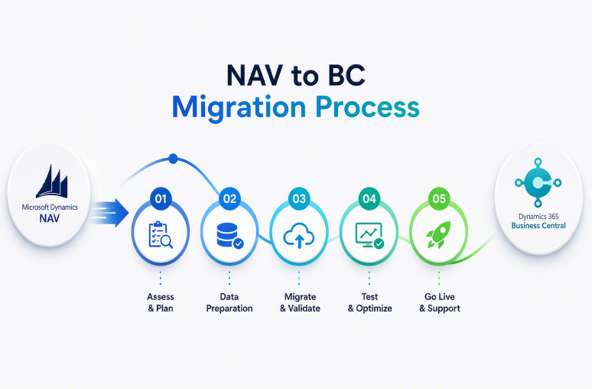
NAV to Dynamics 365 Business Central migration is the process of upgrading legacy Microsoft Dynamics NAV environments into modern cloud-based ERP systems powered by Business Central.
The migration process includes:
- system assessment
- workflow modernization
- cloud transformation
- data migration
- ERP optimization
- operational improvements
Business Central helps organizations simplify operations, automate workflows, improve reporting visibility, and create connected business environments through Microsoft technologies.
Moving from Legacy ERP to Cloud-Based Operations
Cloud ERP environments improve accessibility, scalability, operational flexibility, and business continuity through connected systems and real-time visibility.
Why Businesses Are Upgrading from NAV
Businesses are upgrading from NAV to improve operational efficiency, reduce maintenance complexity, modernize reporting systems, and support scalable business growth.
Connected Microsoft Business Ecosystems
Business Central integrates with Microsoft tools, including Power BI, Power Apps, Outlook, Teams, and Azure, to create connected operational workflows.
How It Work
Common Challenges Businesses Face with Legacy NAV Systems
Challenge 1
Limited Operational Visibility
Disconnected reporting systems and outdated workflows can reduce visibility across finance, inventory, purchasing, and operations.
Challenge 2
Manual Reporting & Workflow Delays
Manual operational processes often create delays in approvals, reporting, communication, and business decision-making.
Challenge 3
Legacy Infrastructure Maintenance Challenges
Older NAV environments may require higher maintenance efforts and operational management complexity.
Challenge 4
Difficulty Integrating Modern Applications
Legacy systems may have limitations when connecting with cloud applications, analytics platforms, and modern operational tools.
Benefits of Migrating to Dynamics 365 Business Central
Cloud-Based ERP Accessibility
Access ERP systems securely from anywhere through cloud-based operational environments.
Real-Time Financial & Operational Reporting
Generate live dashboards and operational insights for faster business decisions.
Improved Workflow Automation
Automate repetitive operational processes, approvals, and reporting workflows.
Better Inventory & Supply Chain Visibility
Improve warehouse management, inventory tracking, procurement workflows, and operational coordination.
Scalable Business Infrastructure
Support business growth through flexible and scalable ERP systems.
Connected Microsoft Ecosystem
Integrate ERP operations with Microsoft technologies, including Power BI, Power Apps, Azure, Outlook, and Teams.
Our NAV to Business Central Migration Services

01
NAV Assessment & Migration Planning
Analyze current ERP environments, operational workflows, reporting systems, and migration requirements to create structured migration roadmaps.

02
Data Migration & Validation
Transfer operational data securely while validating reporting consistency, financial records, and workflow accuracy.
03
Business Central Implementation
Deploy Business Central environments tailored to operational goals, workflows, and business processes.
04
Customization & Workflow Optimization
Improve ERP functionality through workflow automation, operational optimization, and business-specific customizations.
05
Integration Services
Connect Business Central with Power BI, CRM systems, Azure services, APIs, and third-party operational platforms.
06
Post-Migration Support & Optimization
Provide continuous monitoring, support, maintenance, and operational optimization after migration.
Migration Process
Our NAV to Business Central Migration Process
01
Discovery & System Assessment
Understand operational environments, ERP workflows, reporting structures, and migration priorities.
03
Data Preparation & Cleansing
Prepare business data for secure migration and operational consistency.
05
Testing & Validation
Validate workflows, reporting systems, operational processes, and migrated data accuracy.
07
Post-Migration Optimization
Continuously improve ERP workflows, reporting systems, and operational performance after deployment.
02
Migration Strategy & Roadmap Planning
Create migration timelines, workflow strategies, and implementation plans aligned with operational goals.
04
Business Central Deployment
Configure and deploy scalable cloud-based ERP environments.
06
User Training & Go-Live Support
Train teams and provide support during deployment and operational adoption.
Upgrade to a Modern Cloud
ERP Environment
Anywhere Access with Cloud ERP
Securely access ERP environments, operational data, and reporting systems from any location.
Improved Security & Business Continuity
Strengthen operational protection, data management, and system reliability through cloud-based ERP environments.
Connected Operations Across Departments
Unify finance, inventory, purchasing, sales, and reporting workflows through one connected operational ecosystem.
AI-Powered ERP Modernization
AI-Powered Business Insights
Generate intelligent operational insights through connected reporting systems and analytics platforms.
Intelligent Workflow Automation
Automate repetitive business activities and operational workflows more efficiently.
Predictive Operational Reporting
Use real-time analytics and predictive reporting to support operational planning.
Smarter Decision-Making with Real-Time Data
Improve operational visibility and strategic planning through connected ERP intelligence.
Business Central Integrations
Infostork integrates Business Central with Microsoft technologies and operational systems to create connected business ecosystems.
Connected Reporting with Power BI
Integrate Microsoft Power BI for live dashboards, analytics, and operational reporting.
Workflow Automation with Power Apps
Use Microsoft Power Apps to automate workflows and build connected operational applications.
CRM & ERP Connectivity
Connect customer management systems with ERP workflows for better operational coordination.
Cloud Infrastructure with Azure
Improve operational scalability and cloud infrastructure management through Microsoft Azure environments.
Why Businesses Choose Infostork for
NAV Migration
Microsoft Dynamics Expertise
Deep expertise across Business Central, ERP modernization, integrations, and operational workflows.
Structured Migration Methodology
Migration strategies designed to reduce disruptions and improve operational continuity.
Secure Data Migration Processes
Secure migration practices focused on operational accuracy and data consistency.
AI-Driven ERP Innovation
Modern ERP environments are powered by automation, analytics, and intelligent reporting systems.
Business-Focused ERP Strategies
ERP modernization aligned with operational priorities and business growth objectives.
Long-Term Support & Optimization
Continuous optimization, monitoring, and support services after migration.
Frequently Asked Questions
What is the NAV to Business Central migration?
It is the process of upgrading legacy Microsoft Dynamics NAV systems to cloud-based Dynamics 365 Business Central environments.
Why should businesses migrate from NAV?
Businesses migrate to improve operational efficiency, reporting visibility, scalability, workflow automation, and cloud accessibility.
Is Business Central cloud-based?
Yes. Business Central is a cloud-based ERP platform designed for modern business operations.
How long does NAV migration take?
Migration timelines depend on operational complexity, data volume, customization requirements, and business workflows.
Can existing NAV data be migrated securely?
Yes. Infostork provides secure data migration and validation processes to maintain operational consistency.
Will workflows change after migration?
Workflows may be optimized and modernized to improve operational efficiency and automation capabilities.
Can Business Central integrate with Power BI and CRM?
Yes. Business Central integrates with Power BI, CRM systems, Power Apps, Azure, and other Microsoft technologies.
Do you provide post-migration support?
Yes. Infostork provides ongoing support, optimization, monitoring, and operational assistance after migration.
Ready to Modernize Your ERP System?
Upgrade legacy NAV systems with scalable Dynamics 365 Business Central solutions designed to improve operational visibility, automate workflows, strengthen reporting systems, and support long-term business growth.
Infostork delivers Microsoft Dynamics, AI automation, Azure consulting, migration services, and custom application development designed for modern business transformation.